Download & Installation Guide
You can follow the full Cherry DMA setup flow here. Please complete each step in order.
1. Download the Client
First, make sure you have downloaded the latest Cherry package from the official website.
Can't find the official Cherry website?
No problem. Click here to go back to the homepage and download it.
No problem. Click here to go back to the homepage and download it.
2. Run the Installer
Launch the installer you downloaded and follow the prompts to finish the installation.
⚠️ Common warning:
The software may show a
In most cases this is a small network or initialization issue. Press any key to exit, then run the software again.
The software may show a
Key error message. Don't worry.In most cases this is a small network or initialization issue. Press any key to exit, then run the software again.
3. Activate the Software
After the client launches successfully, you will see the login screen.
Enter your license key or trial key, then press Enter to log in.
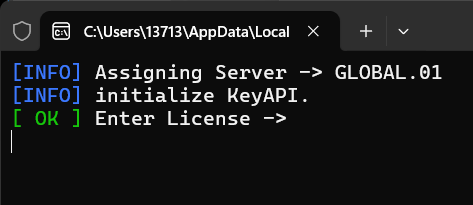
Figure 1.1 - Client login screen example
After logging in successfully, continue with the guides in the left sidebar for feature-specific setup.