🎯 Aimbot & Trigger Configuration
This guide explains Cherry DMA's aimbot logic, close-range hard lock, and auto-trigger options so you can tune the balance between natural play and maximum force.
I. Core Aimbot Settings
5️⃣ Aim Bone
The current version supports multiple selected bones at the same time. Cherry automatically prefers the closest visible bone so it is less likely to lock onto cover or walls.

- Select all: recommended for the best balance of accuracy and forgiveness.
- Single bone: only use it for a very specific play style such as head-only locking.
6️⃣ Max Distance

This sets the maximum range in meters for aimbot activation. Targets farther than this will not be locked.
7️⃣ Field of View

This is the locking circle. Larger values cover more targets, while smaller values keep aiming closer to the center of the crosshair.
8️⃣ Aim Strength

This defines how hard and how fast the crosshair is pulled toward the target.
9️⃣ Smoothing

Higher values look more human and buffered. Lower values look more direct and mechanical.
🔟 Switch Delay

This is the cooldown in milliseconds before the lock switches from one target to another. It helps prevent shaky snapping in crowds.
II. Close-Range Forced Lock
When an enemy enters the configured close range, the system can force-lock the nearest target, ignoring regular FOV or cover limits.
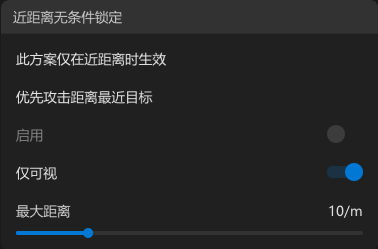
- 🔧 Best for: room fights, corner peeks, and face-to-face engagements.
- 🎯 Suggested distance: around 17 meters.
- ⚠️ Note: This feature has a very high priority and can override dynamic FOV behavior.
III. Auto Trigger
Auto Trigger fires automatically when the crosshair crosses a valid target.
1️⃣ Trigger Key
Choose a key that must be held before Auto Trigger activates. Common picks are right mouse, side buttons, or Shift.
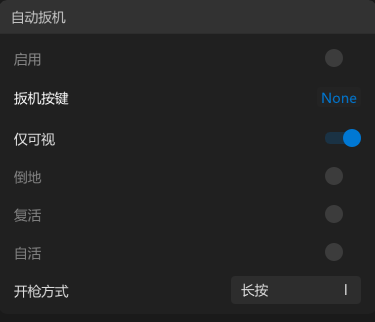
2️⃣ Visible Check
Highly recommended. Only fires at visible targets and helps avoid shooting into walls.

3️⃣ Target State Filters
Downed enemies:
Whether to finish knocked targets.

Reviving enemies:
Whether to shoot enemies currently being revived.

Self-revive enemies:
Whether to shoot targets using self-revive.

4️⃣ Fire Mode

- Click: rapid taps, suitable for pistols, shotguns, and single-shot weapons.
- Hold: simulates holding the fire key down, suitable for rifles and SMGs.